SciENcv Guidance
All You Need to Know About SciENcv!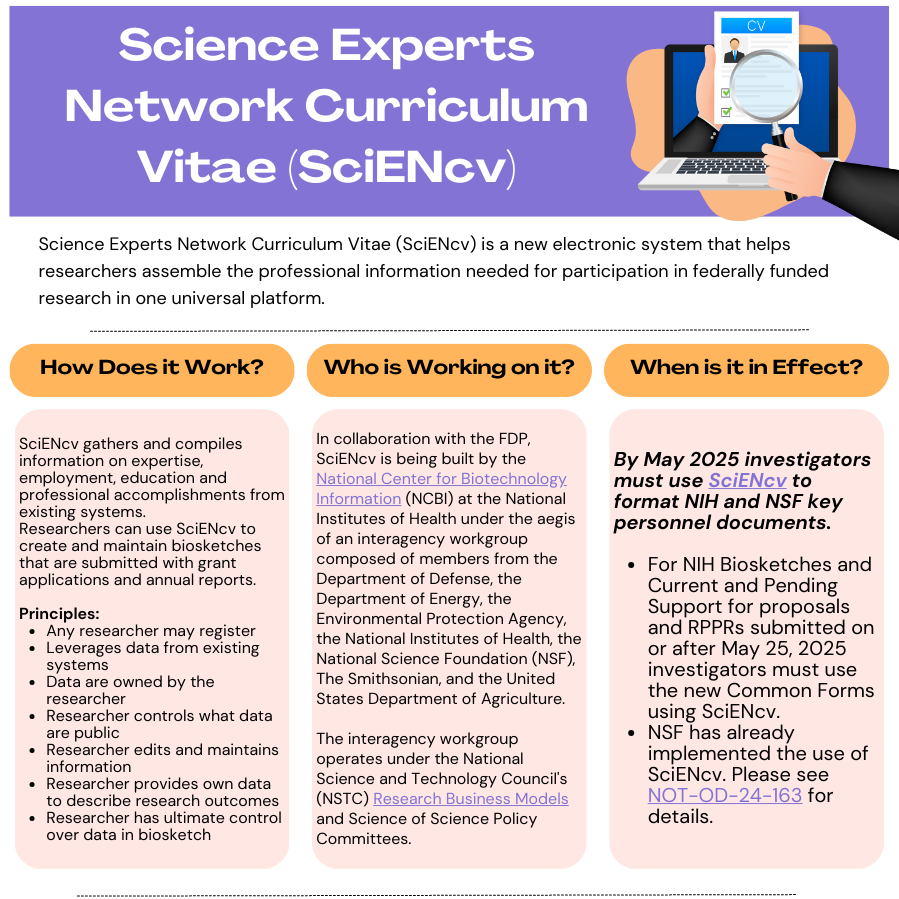
SciENcv(Science Experts Network Curriculum Vitae) is an application in My NCBI that helps you create and manage documents in support of grant applications with participating agencies. In SciENcv you can document your education, employment, research activities, publications, honors, research grants, and other professional contributions. The adoption of this common researcher profile system for Federal grants is intended to reduce administrative burden for researchers. Allow yourself ample time to transition to SciENcv, as the process will require manual data entry and review of data that is imported (e.g. publications).
As a My NCBI account holder, you can invite other individuals to act as your delegate and grant them the ability to view and edit your My Bibliography collection (including Other Citations), as well as the ability to view, edit, and create profiles in your SciENcv. Follow the instructions from the National Library of Medicine on both inviting a delegate and acting as a delegate on their webpage.
Related Notices
NOT-OD-26-079 - Released April 21st, 2026
Effective now through May 7, 2026 NIH will issue warnings only for noncompliant forms. On and after May 8, 2026 leniency period ends and system errors will prevent submission of applications and related actions that do not use compliant Common Forms. This is applicable to all applications, Just-In-Time (JIT) submissions, Research Performance Progress Reports (RPPRs) and prior approval requests with due dates on or after May 8, 2026.
Please Note:
- The NIH Grants Policy Statement (GPS) was updated March 25, 2026, but does not fully reflect Common Forms requirements due to timing. Full incorporation will occur in the next GPS update.
- Research Security Training Certification was added back into Common Forms to support compliance with the CHIPS and Science Act. If forms were certified before April 22, 2026 and not yet submitted, regenerate PDFs before submission. Applications already submitted for due dates on or after May 25, 2026 do not need resubmission; NIH will collect updated documentation at JIT if selected.
NOT-OD-26-033 - Released February 4th, 2026
As NIH continues its phased transition toward the required use of the Common Forms for Biographical Sketch and Current and Pending (Other) Support, it remains important for our research community to stay aligned with the originally communicated implementation expectations. While NIH has introduced a temporary leniency period through May 2026, this extension is intended to support administrative alignment—not to slow institutional readiness. To ensure continuity, reduce downstream administrative burden, and avoid last‑minute compliance challenges, we strongly recommend that investigators and administrators continue preparing SciENcv materials according to the January 25, 2026 timeline. Maintaining this target positions Emory to remain compliant, avoid disruptions to submissions, and ensure a smooth transition as certification and training requirements under NOT‑OD‑26‑017 and NOT‑OD‑26‑018 become fully operational.
NOT-OD-26-018 - Released December 2nd, 2025
Use of the Common Forms for Biographical Sketch, Current and Pending (Other) Support and NIH Biographical Sketch Supplement will be required for application due dates and all JIT, RPPR, and Prior Approval submissions on or after January 25, 2026.
NOT-OD-25-133 - Released July 17th, 2025
This Guide Notice announces a new policy requirement that requires NIH recipients to provide training to all faculty and researchers identified as Senior/Key Personnel on the requirement to disclose all research activities and affiliations (active and pending) in Other Support (see Other Support form).
The NIH FAQs section is frequently updated with new information. Please check back regularly.
ORCID iD
All individuals submitting common forms must obtain an ORCID iD and link it to one eRA Commons account and SciENcv account. An ORCID/record is a free account that creates a persistent identifier that will follow you throughout your career and allows you to gather all of your scholarly work in a single location. You can use it to add publications to your Biosketch that are not included in PubMed.
To populate SciENcv biosketch with ORCID iD:
- Go into SciENcv and initiate the creation of a biographical sketch.
- Select ORCID as your external data source (If you do not have an ORCID iD yet, guidance can be found on Emory Libraries web pages.)
For more detailed information view NIH’s FAQs and our additional resources below.
ORCID reminders:
- You must ensure ORCID appears in the Persistent Identifier (PID) field of the Common Form.
- The ORCID in SciENcv must match the ORCID in the individual’s eRA Commons profile.
- ORCID iD issues must be resolved via the eRA Service Desk.
Frequently Asked Questions
A preview of the Biographical Sketch Common Form, NIH Biographical Sketch Supplement, and Current and Pending (Other) Support Common Form and instructions are currently available in Science Experts Network Curriculum Vitae (SciENcv) (see Guide Notice NOT-OD-25-152).
Additional Resources
SciENcv Refresher Workshop
Learn key information about creating your SciENcv account and simplifying your grant preparation process in compliance with federal regulations.
Session Recording:
Wednesday, January 21st (11am-12pm)ORA SciENcv Bootcamp Series for Research Administrators
A comprehensive 3-part ORA Boot Camp series. Each one-hour session is designed to equip you with essential tools for managing roles and research documentation in SciENcv.
- “Delegate Roles in SciENcv & My Bibliography”
- “Using SciENcv with a Delegate Role”
- “Delegate Best Practices and Lessons Learned.”
Please note: the direct link works best if you are first logged into Brainier prior to clicking on the above links. Alternatively, in place of the above links, you may access Brainier via Self-Service and search for the name of the training
For either method, please refer to this helpful guide on accessing Brainier and how to register for a training.
Other Guides and Tutorials
Contact Us
For questions or additional guidance, please contact the Research Security Office: researchsecurity@emory.edu